WordPress is losing market share. I would still pick it.
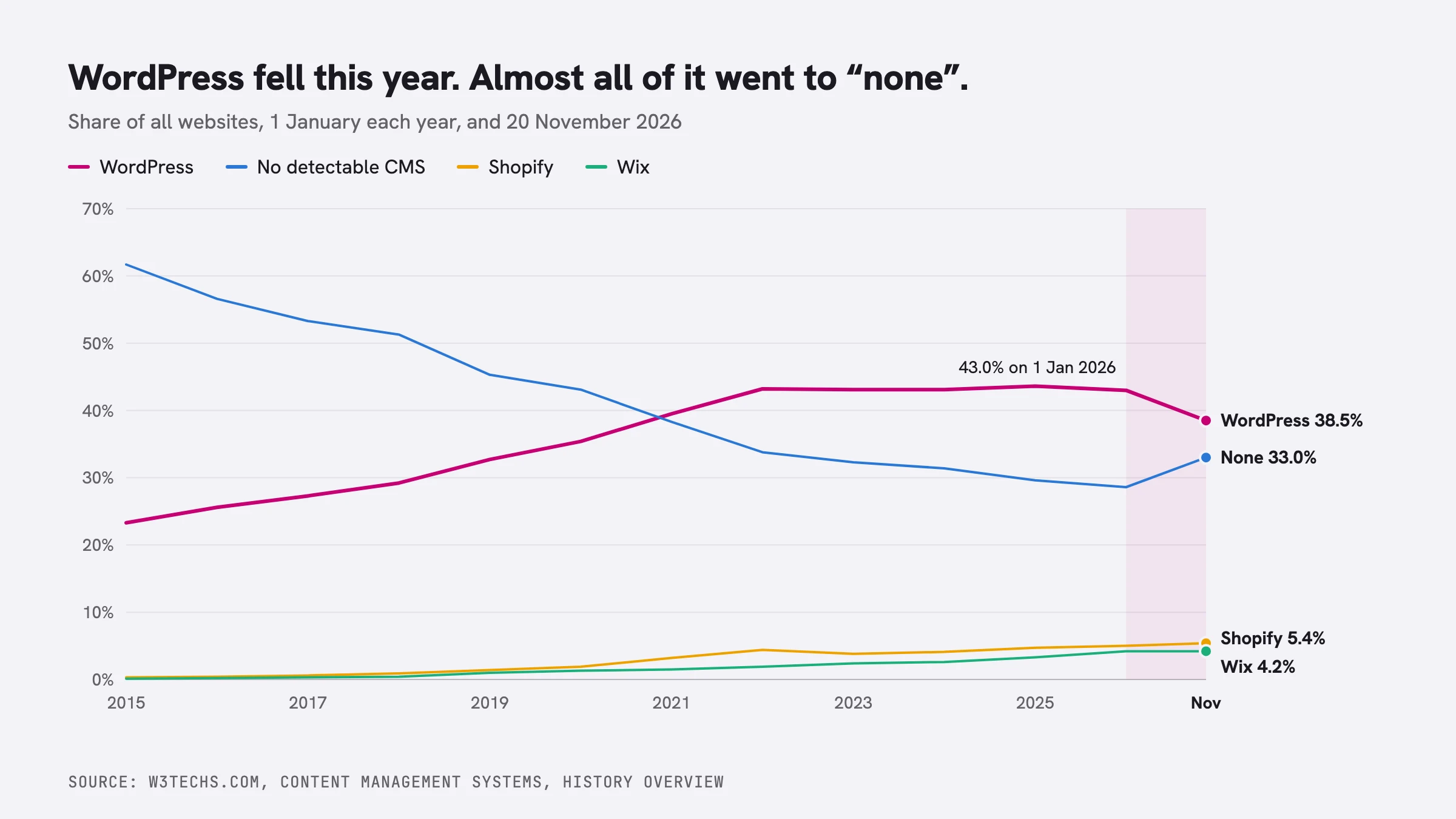
On 1 January 2025, W3Techs counted WordPress on 43.6% of all websites. This morning the figure is 38.5%. Since 2015, WordPress had never lost more than six tenths of a point in a year. It has lost four and a half since January.
I am part of that number. In April 2025 I moved this blog off WordPress after thirteen years and wrote about why. This site is a Next.js app. I would make the same decision again.
But I also think WordPress is still the best way for most people and most companies to build a website, and I have said so to everyone who asked me this year. Both statements hold, and the W3Techs data explains why.
The share went to "none"
Between 1 January and 20 November 2026, the share of all websites moved like this:
| 1 Jan 2026 | 20 Nov 2026 | Change | |
|---|---|---|---|
| WordPress | 43.0% | 38.5% | -4.5 |
| No detectable CMS | 28.6% | 33.0% | +4.4 |
| Shopify | 5.0% | 5.4% | +0.4 |
| Wix | 4.2% | 4.2% | 0.0 |
| Squarespace | 2.4% | 2.4% | 0.0 |
| Joomla | 1.3% | 1.0% | -0.3 |
| Drupal | 0.8% | 0.6% | -0.2 |
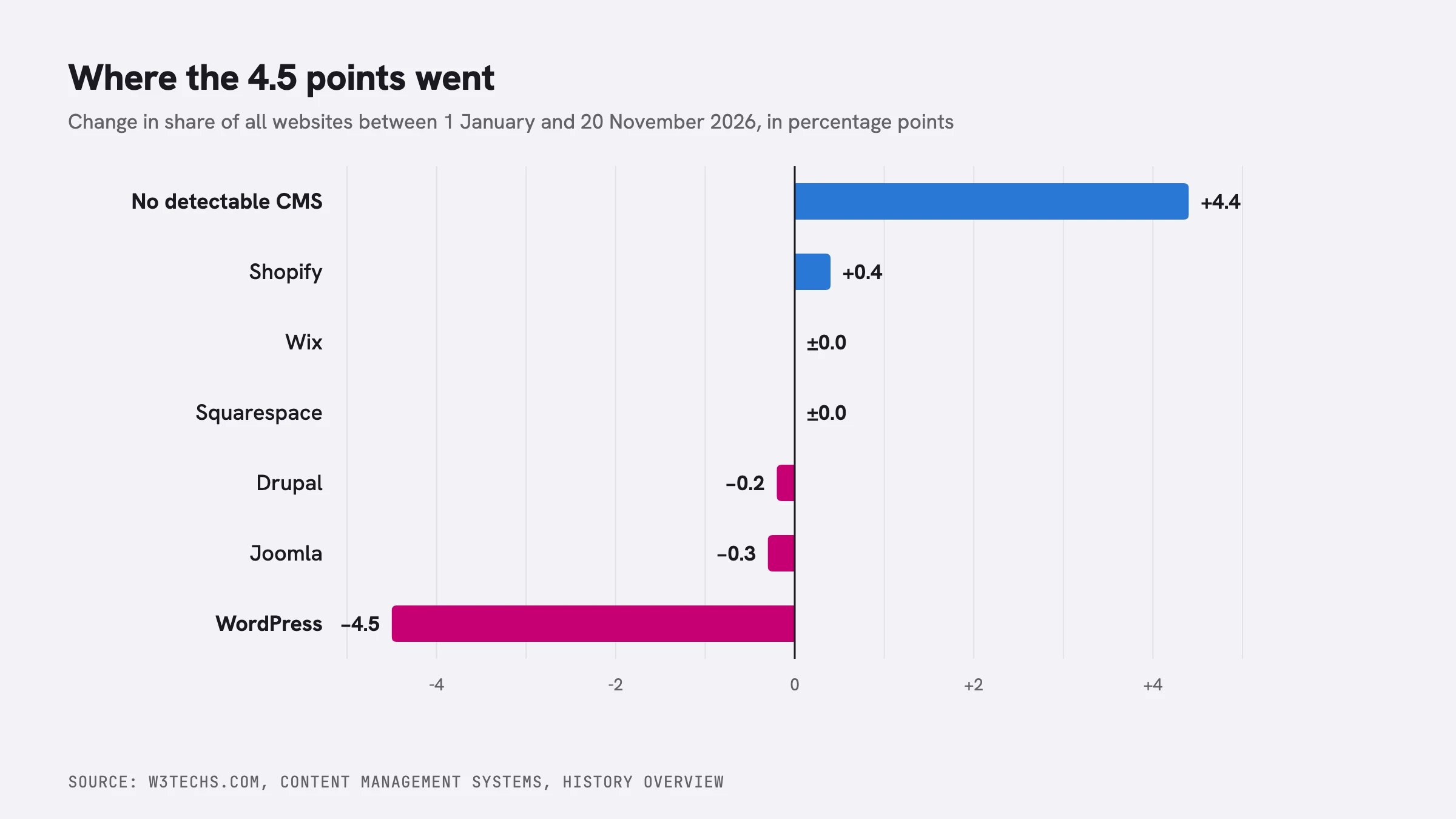
Shopify gained four tenths of a point. Wix and Squarespace did not move. Almost all of the 4.5 points WordPress lost went into the row W3Techs calls "none": websites where it cannot detect any of the content management systems it tracks.
For ten years that row only went down. It was 61.7% of the web in 2015 and 28.6% in January 2026, because people who used to hand-code sites moved to a CMS, and most of them moved to WordPress. This year the curve turned around.
W3Techs does not say what is inside "none", and from the outside I cannot rule out that part of the jump comes from a change in how they detect things. But I know what one of those sites looks like, because you are reading it. This blog has no CMS. Every post is an MDX file in a git repository.
The table has another clue. Lovable, the AI app builder, is now twelfth in the W3Techs ranking with 0.5% of all websites, the same order of size as Drupal at 0.6%. My reading, which W3Techs does not measure, is that a large part of the new "none" is sites written in an afternoon by an AI assistant: a React app, a landing page, a Next.js project like mine.
So WordPress did not lose this year to a better CMS. It lost to sites with no CMS at all. For each of those sites, the question to ask is who will publish on it next year.
Who publishes the next post
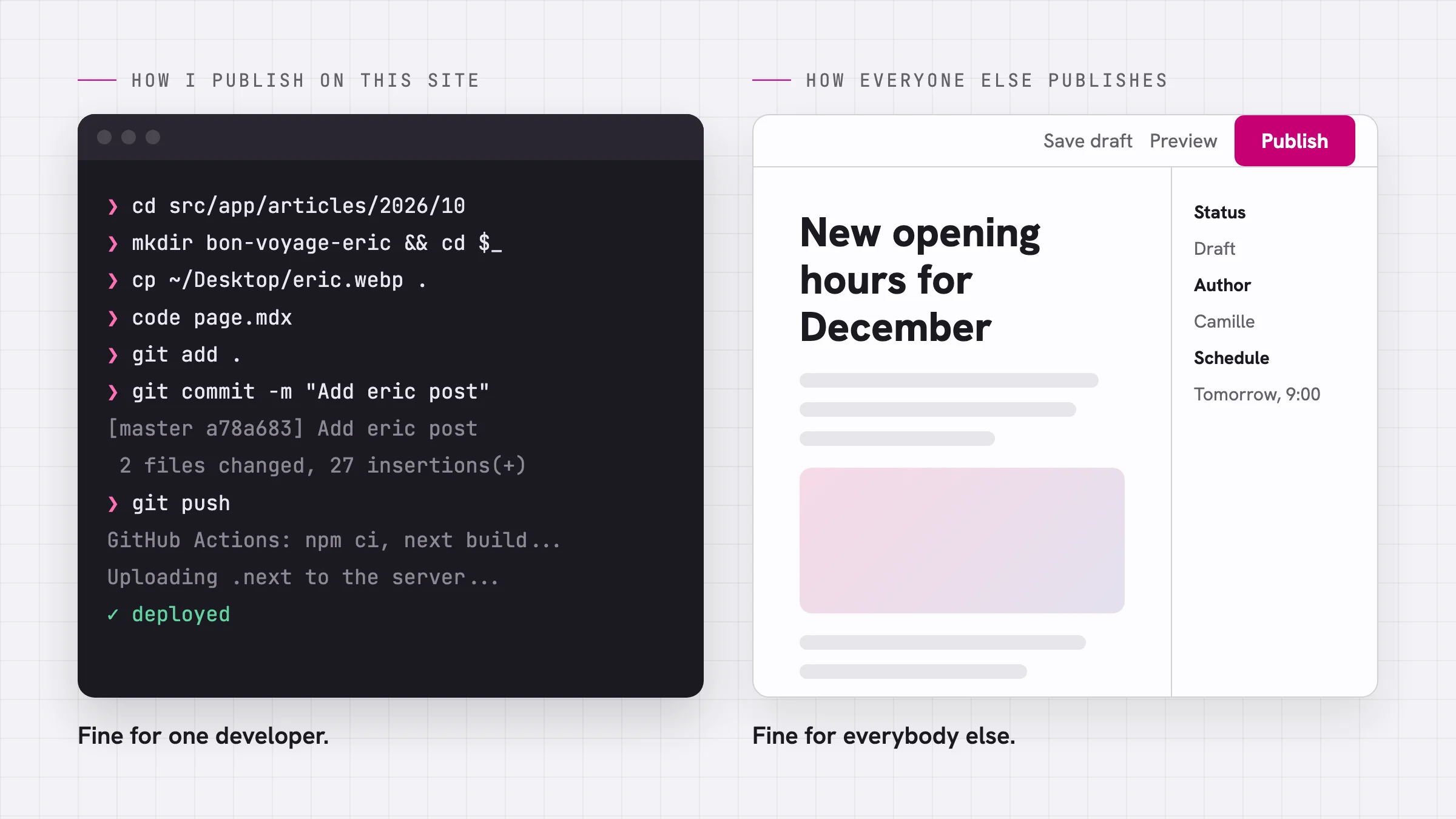
This is how I published my last post. Create a folder, copy the photo in, write the MDX, commit, push, and wait for a GitHub Action to build the site and send it to my host.
It works for me because I write code every day, and nobody else publishes on this site.
Now think of a bakery, a law firm, a primary school, a newsroom with nine writers, or a charity whose site is updated by a volunteer on Tuesday evenings. For all of them, the website is a place where people who do not code publish things, and the developer who built it left months ago. WordPress was designed for that situation in 2003, and nothing released since covers it as well.
What you get with WordPress
An editor people can use without calling you
Users and roles (administrator, editor, author, contributor), drafts, scheduled posts, revisions, a media library, comments, menus. All of it is in core and all of it is free.
WordPress 7.0, released on 20 May 2026, added visual revisions, a suggestions mode in Notes, and a command palette across the whole admin. Real-time collaboration was removed twelve days before release because the team did not think it was ready for core, and you can still test it with the Gutenberg plugin. I prefer a project that pulls a headline feature to one that ships it broken.
In 2025 I wrote that the block editor had become painful for developers. I still think so. For people writing content it is a different story: they open the editor, type, add images, press Publish, and never file a ticket.
Your site, on any host
WordPress is GPL software that runs on PHP and MySQL, which almost every host in the world sells for a few euros a month. Tools, Export gives you all your content as an XML file. If your host gets slower, you move. If your agency closes, another one takes over the same site the following week.
Compare that with a hosted platform, where your site exists as long as you keep paying that one company and accept its terms.
60,000 free plugins
Forms, bookings, memberships, courses, multilingual sites, newsletters, events, online shops. Most problems a small organisation has were solved in a plugin years ago, and many of those plugins are still maintained by the same people. Quality varies.
People who know it
WordPress has the largest pool of freelancers, agencies, hosts, meetups and WordCamps of any CMS. Finding someone in Lyon or Lagos who can fix a WordPress site takes a day. Finding someone who wants to take over a custom Astro build with a headless CMS that a stranger wrote two years ago takes a lot longer.
Backward compatibility as a rule
The WordPress core team treats breaking existing sites as a bug. Themes and plugins from ten years ago still run on current versions, more often than not. Few projects in our industry have kept that promise for twenty years. In August I wrote about two French CMS projects from 2001, and only one of them is still around.
AI in core, with your choice of provider
WordPress 7.0 ships an AI Client and a Connectors screen in core. The site owner connects the provider they want (OpenAI, Google, Anthropic or others), and plugins use that connection through one API instead of each asking for its own key. You are not tied to one model vendor, and neither are your plugins.
Headless when you want it
The REST API has been in core since 2016. You can keep editors in wp-admin and put an Astro or Next.js front end in front of it, as I described in an introduction to the REST API. Picking WordPress does not lock you out of a modern front end.
The weak points are real
Plugins are the main security risk. Most reported WordPress vulnerabilities are in plugins and themes, not in core. A plugin abandoned in 2021 can still be installed today.
Updates are someone's responsibility. Either yours, your agency's, or your host's. A WordPress site nobody updates for three years is a liability.
Cheap hosting makes slow sites. WordPress on a good host with page caching is fast. WordPress on a crowded shared server with forty plugins is not.
The block editor is hard to extend. Building custom blocks asks a lot of developers, and I said so in 2025. But, with help of AI, you can build them in minutes.
All four are reasons to pick a decent host, keep a short list of maintained plugins, and turn on automatic updates. None of them is a reason to rebuild the site in a JavaScript framework.
Next.js is a framework, not a CMS
Next.js is excellent, and I use it. It is the right tool for web applications, dashboards, products with logins, and developers who want full control.
It is not a CMS. Out of the box there is no editor, no users, no media library, no drafts, no scheduled posts. You build each of these or connect a separate service.
Hosting adds work too. Next.js runs best on Vercel, the company that makes it. I host on O2switch, which meant writing a GitHub Action that builds the site and uploads it on every push.
Astro is the best framework for content, and still a framework
If I were starting this blog today I would probably use Astro. It renders HTML at build time, sends very little JavaScript, and suits content sites better than any other JavaScript framework. In January 2026 Cloudflare bought the company behind it, and the framework stays under the MIT licence.
Astro has the same limit as Next.js. Your content lives in Markdown files in a repository, or in a CMS you add yourself. That second option led Cloudflare to build one.
EmDash has a good idea and plugins
Cloudflare announced EmDash on 1 April 2026 and called it a "spiritual successor" to WordPress. It is a TypeScript CMS built on Astro, and version 1.0 shipped on 28 September.
The interesting part is the plugin model. Each EmDash plugin runs in its own sandbox and has to declare what it needs access to. A plugin that adds a contact form cannot read your users table. WordPress plugins can do anything PHP can do, and that is the root of the security problem I described above. The WordPress project should take this criticism seriously.
The rest is early. At 1.0, press coverage counted about a dozen plugins in the registry, against more than 60,000 on WordPress.org. The sandbox relies on Cloudflare's Dynamic Workers, so the security model is at its best on Cloudflare's own platform. And one of the main features is an importer that takes your WordPress site as an XML export, which tells you where Cloudflare expects its users to come from.
I will look at it again in two years. Today, I would not put a client on it.
Strapi is half a website
Strapi is a headless CMS written in Node.js, with a good admin for structured content. Developers like it, and for a product team that already has front-end developers on staff, it is a sensible choice.
But Strapi stores and serves content; it does not display it. You still need a front end in Next.js or Astro, and you now host two applications instead of one, each with its own updates. Strapi Cloud also dropped its free plan, so the hosted version is a monthly cost per project. For the bakery, this doubles the number of things that can break.
Shopify is a good product you rent
Among the established platforms in the W3Techs table, Shopify is the only one that gained share this year, and it deserves it. For a merchant who wants to sell and never think about servers, Shopify is a good product, and I would not try to talk anyone out of it.
You do pay for that comfort, every month and on every order. There is the plan. There are the apps, most of them billed monthly. And if you use a payment provider other than Shopify Payments, Shopify adds its own fee on each order, on top of what your provider charges: 2% on the Basic plan, down to 0.2% on Plus. Your checkout follows Shopify's rules, and your store exists as long as your account does.
WooCommerce is a free plugin. It takes no platform fee on your orders, works with almost any payment provider, and keeps your orders and customers in your own database. Your shop also lives in the same WordPress as your blog and your landing pages, which matters because content brings search traffic to a shop. I worked on WooCommerce at Automattic, so take my enthusiasm with that in mind, but the arithmetic on the fees is public.
Side by side
| WordPress | Next.js | Astro | EmDash | Strapi | Shopify | |
|---|---|---|---|---|---|---|
| Non-developers can publish | Yes | Only if you build or add a CMS | Only if you add a CMS | Yes | Yes, plus a front end | Yes |
| Licence | GPL | MIT | MIT | MIT | MIT core, paid editions | Proprietary |
| Where it runs | Any PHP host | Vercel, or any Node host with more work | Anywhere | Cloudflare, or Node | Any Node host, plus your front end | Shopify only |
| Extensions | 60,000+ free plugins | npm packages | Integrations | About a dozen at 1.0 | Marketplace | App Store, mostly monthly |
| Online shop | WooCommerce, no platform fee | Build or connect | Build or connect | First plugin in progress | Build or connect | Built in, fees per plan |
| SEO | Core sitemap, plugins for the rest | You write it | Integrations | Early | Your front end's problem | Built in, limited control |
| Who can maintain it | Huge pool of people | Developers | Developers | Few people yet | Developers | Shopify |
SEO is a plugin decision, not a project
I am the CTO of SEOPress, so read this section knowing that.
On WordPress, good SEO does not require a developer. Core has generated an XML sitemap since version 5.5, and an SEO plugin covers the rest. On more than 300,000 sites, SEOPress handles:
- Titles and meta descriptions for every post, page, product and archive, with dynamic variables so you write one template per content type instead of a thousand descriptions by hand
- XML sitemaps (including images), an HTML sitemap, and full control over what is indexed, through noindex, nofollow and canonical settings per page
- Open Graph and X cards, so a shared link shows the right title and image
- Content analysis while you write, and analytics with cookie consent
- One-click migration from Yoast SEO, Rank Math, All in One SEO and others, so switching costs you nothing
- With SEOPress PRO: structured data (articles, products, local business, FAQ, events and more), breadcrumbs, redirections and 404 monitoring, WooCommerce SEO, Google Search Console data in your dashboard, and AI-generated titles, descriptions and image alt text
When I would not pick WordPress
- You are building an application with logins, dashboards and business logic: use Next.js.
- You are a developer and the site is your own playground: use what you enjoy. I did.
- You sell products, want zero maintenance and accept the fees: use Shopify.
- You have a team of developers and need structured content for an app and a website at once: look at Strapi, or at WordPress as a headless CMS.
For everyone else, which is most people who want a website, install WordPress on a good host, keep the plugin list short, turn on automatic updates, and install an SEO plugin. I know which one I would choose.
At 38.5% of all websites, WordPress still runs more sites than every other CMS in the W3Techs table combined. The comparison to watch is not WordPress against Shopify. It is WordPress against "none", and that depends on who will maintain all those AI-built sites in 2028.