/Remi Corson
WooCommerce Stripe: Add Custom MetaData
Adding custom metadata to Stripe is easy with WooCommerce Stripe. You can send any kind of value to Stripe from WooCommerce itself. Pretty handy right?
The result that we want to achieve is shown in the following screenshot:
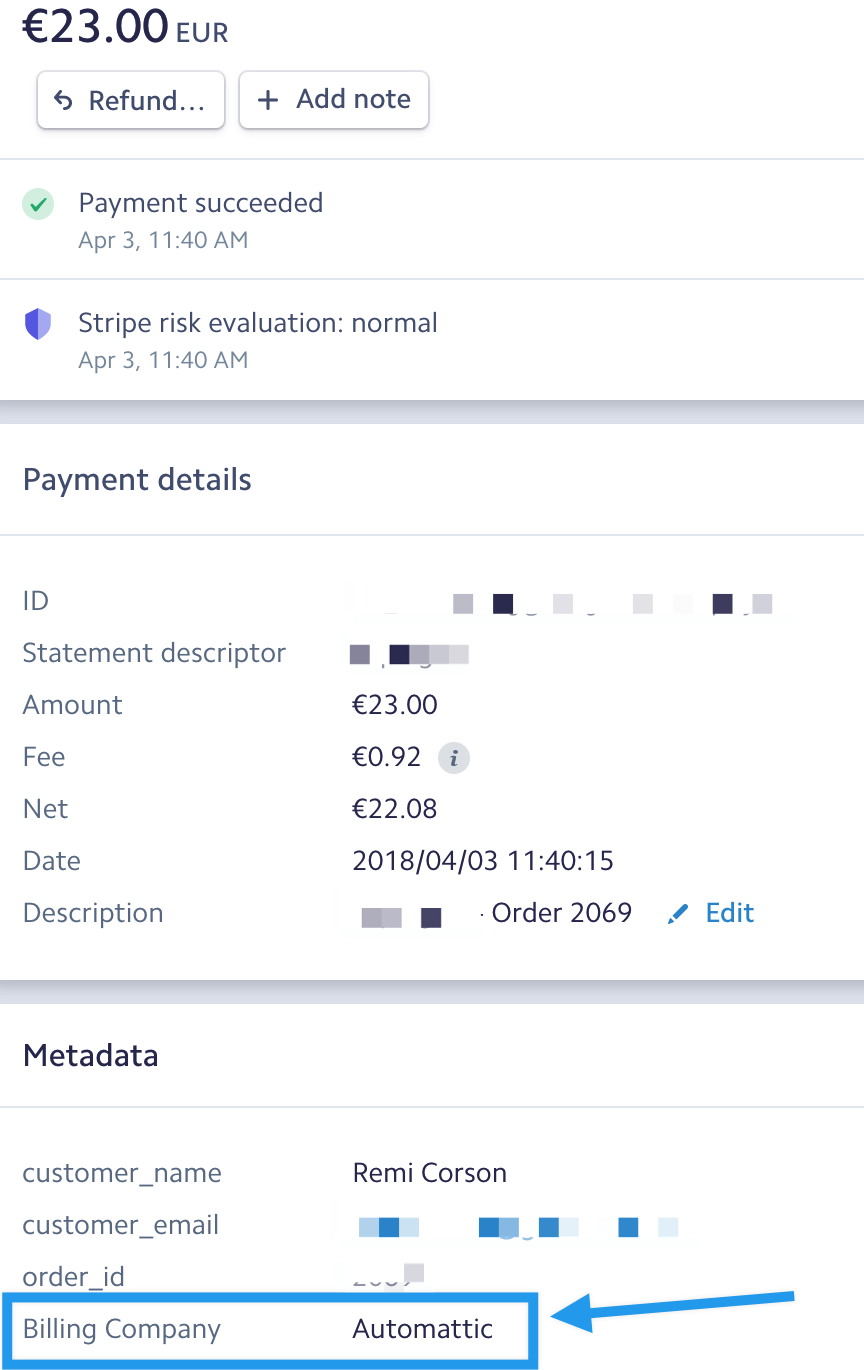
To do so, all you have to do is to create a function that will be tied to the wc_stripe_payment_metadata filter.
<?php
$order->get_data(); (not needed is using the code above)

$order_id = $order_data['id'];
$order_parent_id = $order_data['parent_id'];
$order_status = $order_data['status'];
$order_currency = $order_data['currency'];
$order_version = $order_data['version'];
$order_payment_method = $order_data['payment_method'];
$order_payment_method_title = $order_data['payment_method_title'];
$order_payment_method = $order_data['payment_method'];
$order_payment_method = $order_data['payment_method'];

## Creation and modified WC_DateTime Object date string ##

// Using a formated date ( with php date() function as method)
$order_date_created = $order_data['date_created']->date('Y-m-d H:i:s');
$order_date_modified = $order_data['date_modified']->date('Y-m-d H:i:s');

// Using a timestamp ( with php getTimestamp() function as method)
$order_timestamp_created = $order_data['date_created']->getTimestamp();
$order_timestamp_modified = $order_data['date_modified']->getTimestamp();


$order_discount_total = $order_data['discount_total'];
$order_discount_tax = $order_data['discount_tax'];
$order_shipping_total = $order_data['shipping_total'];
$order_shipping_tax = $order_data['shipping_tax'];
$order_total = $order_data['cart_tax'];
$order_total_tax = $order_data['total_tax'];
$order_customer_id = $order_data['customer_id']; // ... and so on

## BILLING INFORMATION:

$order_billing_first_name = $order_data['billing']['first_name'];
$order_billing_last_name = $order_data['billing']['last_name'];
$order_billing_company = $order_data['billing']['company'];
$order_billing_address_1 = $order_data['billing']['address_1'];
$order_billing_address_2 = $order_data['billing']['address_2'];
$order_billing_city = $order_data['billing']['city'];
$order_billing_state = $order_data['billing']['state'];
$order_billing_postcode = $order_data['billing']['postcode'];
$order_billing_country = $order_data['billing']['country'];
$order_billing_email = $order_data['billing']['email'];
$order_billing_phone = $order_data['billing']['phone'];

## SHIPPING INFORMATION:

$order_shipping_first_name = $order_data['shipping']['first_name'];
$order_shipping_last_name = $order_data['shipping']['last_name'];
$order_shipping_company = $order_data['shipping']['company'];
$order_shipping_address_1 = $order_data['shipping']['address_1'];
$order_shipping_address_2 = $order_data['shipping']['address_2'];
$order_shipping_city = $order_data['shipping']['city'];
$order_shipping_state = $order_data['shipping']['state'];
$order_shipping_postcode = $order_data['shipping']['postcode'];
$order_shipping_country = $order_data['shipping']['country'];
<?php // Do not include this if already open! Code goes in theme functions.php.

/*
* Add "Billing Company" value to Stripe metadata
*/
function filter_wc_stripe_payment_metadata( $metadata, $order, $source ) {

$order_data = $order->get_data();
	$metadata[ __( 'Billing Company', 'woocommerce-gateway-stripe' ) ] = sanitize_text_field( $order_data['billing']['company'] );

	return $metadata;
}
add_filter( 'wc_stripe_payment_metadata', 'filter_wc_stripe_payment_metadata', 10, 3 );
<?php

$count = 1;
foreach( $order->get_items() as $item_id => $line_item ){
    $item_data = $line_item->get_data();
    $product = $line_item->get_product();
    $product_name = $product->get_name();
    $item_quantity = $line_item->get_quantity();
    $item_total = $line_item->get_total();
    $metadata['Line Item '.$count] = 'Product name: '.$product_name.' | Quantity: '.$item_quantity.' | Item total: '. number_format( $item_total, 2 );
    $count += 1;
}

return $metadata;
In this example, the “Billing Company” name will be added to the array of fields sent to Stripe!
<?php
$order->get_data(); (not needed is using the code above)

$order_id = $order_data['id'];
$order_parent_id = $order_data['parent_id'];
$order_status = $order_data['status'];
$order_currency = $order_data['currency'];
$order_version = $order_data['version'];
$order_payment_method = $order_data['payment_method'];
$order_payment_method_title = $order_data['payment_method_title'];
$order_payment_method = $order_data['payment_method'];
$order_payment_method = $order_data['payment_method'];

## Creation and modified WC_DateTime Object date string ##

// Using a formated date ( with php date() function as method)
$order_date_created = $order_data['date_created']->date('Y-m-d H:i:s');
$order_date_modified = $order_data['date_modified']->date('Y-m-d H:i:s');

// Using a timestamp ( with php getTimestamp() function as method)
$order_timestamp_created = $order_data['date_created']->getTimestamp();
$order_timestamp_modified = $order_data['date_modified']->getTimestamp();


$order_discount_total = $order_data['discount_total'];
$order_discount_tax = $order_data['discount_tax'];
$order_shipping_total = $order_data['shipping_total'];
$order_shipping_tax = $order_data['shipping_tax'];
$order_total = $order_data['cart_tax'];
$order_total_tax = $order_data['total_tax'];
$order_customer_id = $order_data['customer_id']; // ... and so on

## BILLING INFORMATION:

$order_billing_first_name = $order_data['billing']['first_name'];
$order_billing_last_name = $order_data['billing']['last_name'];
$order_billing_company = $order_data['billing']['company'];
$order_billing_address_1 = $order_data['billing']['address_1'];
$order_billing_address_2 = $order_data['billing']['address_2'];
$order_billing_city = $order_data['billing']['city'];
$order_billing_state = $order_data['billing']['state'];
$order_billing_postcode = $order_data['billing']['postcode'];
$order_billing_country = $order_data['billing']['country'];
$order_billing_email = $order_data['billing']['email'];
$order_billing_phone = $order_data['billing']['phone'];

## SHIPPING INFORMATION:

$order_shipping_first_name = $order_data['shipping']['first_name'];
$order_shipping_last_name = $order_data['shipping']['last_name'];
$order_shipping_company = $order_data['shipping']['company'];
$order_shipping_address_1 = $order_data['shipping']['address_1'];
$order_shipping_address_2 = $order_data['shipping']['address_2'];
$order_shipping_city = $order_data['shipping']['city'];
$order_shipping_state = $order_data['shipping']['state'];
$order_shipping_postcode = $order_data['shipping']['postcode'];
$order_shipping_country = $order_data['shipping']['country'];
But you can add much more, here is a list of variables that you can use:
And if you want to add products details as well, you can do something like this:
<?php

$count = 1;
foreach( $order->get_items() as $item_id => $line_item ){
    $item_data = $line_item->get_data();
    $product = $line_item->get_product();
    $product_name = $product->get_name();
    $item_quantity = $line_item->get_quantity();
    $item_total = $line_item->get_total();
    $metadata['Line Item '.$count] = 'Product name: '.$product_name.' | Quantity: '.$item_quantity.' | Item total: '. number_format( $item_total, 2 );
    $count += 1;
}

return $metadata;